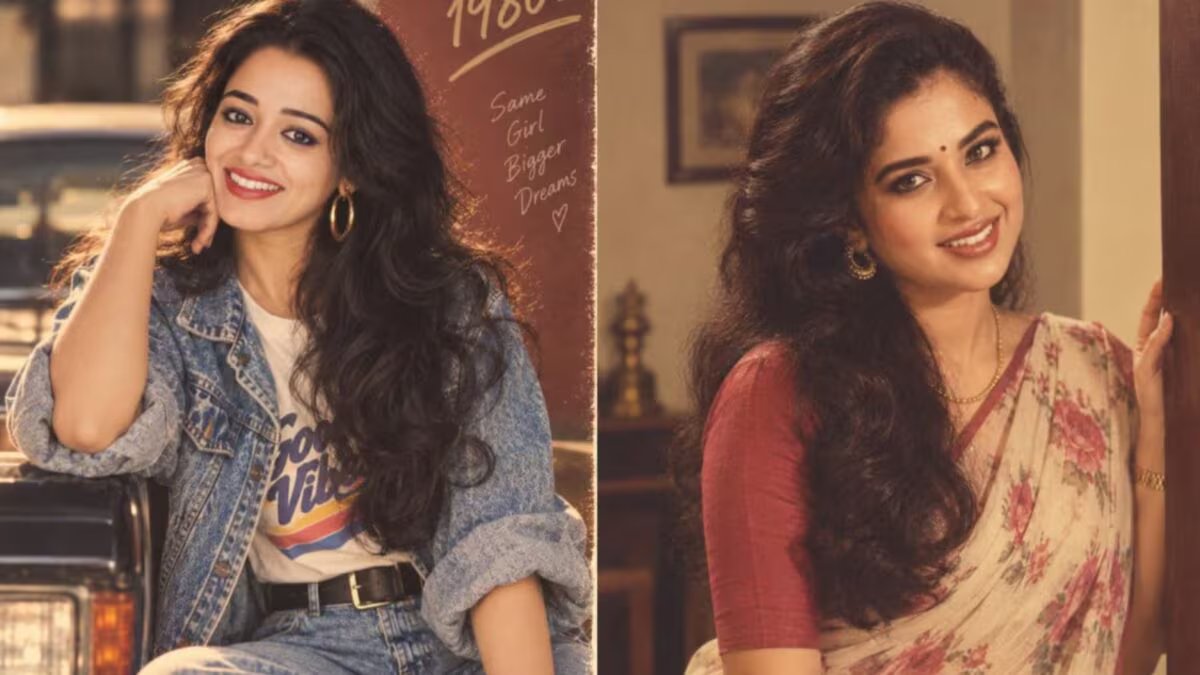
These days, a new trend of AI photos is becoming increasingly viral on social media. People are changing their normal photos into the style of 1960s, 1970s, 1980s and 1990s with the help of Artificial Intelligence. The special thing is that the face remains the same in the photo, but the clothes, hairstyle, background, colors and the entire atmosphere of the photo starts appearing like that era.



From celebrities to common social media users are trying this trend. Old-fashioned hairstyles, big and different clothes, vintage colors and film camera-like grainy images are making these AI photos special. Many of the photos look as if they have been taken out of an old family photo album or fashion magazine.
If you also want to change your photo in the style of different decades, then you can use the Hindi prompt given below in ChatGPT, Google Gemini, Grok or any other AI photo editing tool.
1. Classic 1960s look
‘Convert this image to an original studio portrait photo from the 1960s. Keep the facial identity, facial structure, skin color, face shape and natural form exactly the same, do not make any changes in them. Dress up in an elegant 1960s-inspired outfit featuring sleek designs, vintage jewelry, and a classic retro hairstyle with plenty of volume. Set a sophisticated backdrop like a 1960s studio. Stick to softly directional lighting, light film grain, slightly subdued colors, and a texture similar to old analog camera photos. The photo looks as if it was actually taken in the 1960s and not computer generated.
With this prompt, 60s clothing, jewelry, and hairstyles can be included in the photo while maintaining facial identity. Light film grain and subdued colors will give it the feel of an old photo.
2. 1970s look
‘Transform this image into a glamorous 1970s portrait photo, but do not change the facial identity, facial structure, skin color or natural appearance at all. Dress stylishly in 1970s-inspired outfits featuring warm earthy colors, light and flowy fabrics, statement-making chunky jewelery and layered hairstyles from that era. Have a warm vintage interior in the background, giving off a slightly glamorous feel of the 1970s. Keep the golden ambient lighting, brown and amber colors, light grain of real analog film and the texture of a slightly faded old photo. The whole picture looks like a beautiful family or fashion photo from the 1970s.”
This will reflect the warm colors of the 70s, flowy clothes, big jewelery and layered hairstyles. Golden lighting and texture like old photos will make it more real.
3. 1980s Bollywood Glam
Transform this photo into an authentic and glamorous 1980s Bollywood portrait photo. Keep my facial recognition, facial structure, expressions, skin color and natural features exactly the same. Dress in bold and 1980s-inspired outfits with dramatic designs, bold and bright colors, big statement earrings and voluminous hair from that era. Keep a background with a classic studio or cinematic atmosphere, which has a slight retro feel. Keep the tone of dramatic but soft lighting, subtle flash effects, analog film grain and true 1980s colors.
This prompt is to give the photo a glamorous look like 80s Bollywood movies. Bold clothes, bright colors, big earrings and big hair will create the look of that era.
4. 1980s Hollywood look
Transform this photo into a glamorous 1980s Hollywood portrait photo. Do not change facial recognition, facial features, face shape, skin color, natural skin and recognizable appearance at all and do not try to make the face more beautiful than necessary. Dress up in stunning outfits inspired by famous Hollywood actresses of the 1980s, with bold shoulders, expensive-looking fabrics and beautiful jewellery. Keep hair voluminous and well-set in accordance with 1980s fashion. Keep your eye makeup bold and your lips shiny. Have a classic Hollywood studio or a luxurious Beverly Hills-style interior in the background. “Give the effect of cinematic soft-focus lighting, soft flash and warm analog film.”
This will give the picture the Hollywood glamor of the 80s. Bold shoulders, stunning clothes, big hairstyle and bright makeup will be the specialty of this look.
5.1990s style
‘Turn this photo into a stylish 1990s portrait photo, but don’t change the facial identity, facial features, skin color, face shape and natural look at all. Dress in a casual and cute 1990s inspired outfit. Keep jewelery very light and simple. Keep your hair and makeup in a 1990s style, with bright lips and light smoky eye makeup. The background should be like a simple studio, bedroom or an urban café of that era. Use soft natural light and a modest flash. Keep the colors a little less bright and slightly faded, so that the photo looks exactly like the original photo taken in the 1990s.
The 90s prompt is for those who want a simple and stylish style of that era instead of a very glamorous look. Pale colors and natural light can make a photo look like it was taken with an old camera.
Be careful not to change facial recognition
One thing specifically mentioned in all these prompts is that facial identity, facial features, skin color and face shape should not be changed. This is so that AI styles the photo according to that era, but the identity of the person does not change. That is, instead of giving a new face to your face, AI changes the clothes, hair, makeup, background, lighting and color of the photo according to that decade. For this reason, this trend on social media is reminding people of old family photo albums. People are creating a unique vintage picture of their own by changing their present day picture into the style of 60s, 70s, 80s or 90s.